Welcome to AccuQuilt.com

Shopping Cart (0) Items

FREE SHIPPING on orders of $99 or more! See details.

Studio Fabric Cutter

Item 50800

You could receive 10 AQ Points for writing a review and/or rating this product.
Shipping Details

In stock

$595.00
You will earn 601 AQ Points for buying this product

Quick Overview

NEW GO! Die Adapters for Studio
Now you can use every GO! die with your Studio Fabric Cutter! Shop Now

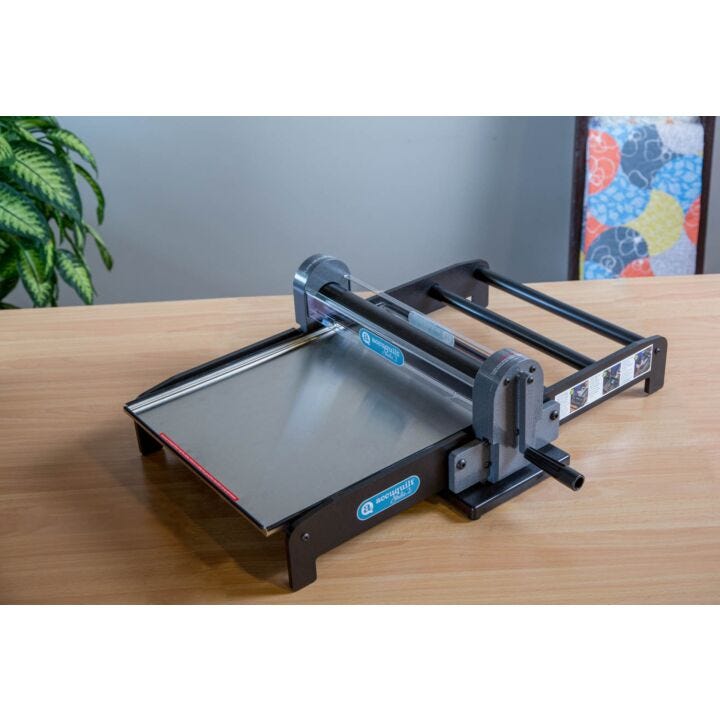
The time-saving AccuQuilt Studio is the premier fabric cutter on the market. This system is specially designed for quilt shops, fabric craft retailers and experienced and prolific home quilters. It quickly and easily cuts up to 10 layers of fabric for quilting, appliques, fabric-covered objects, strips and novelty projects. That's the kind of quality and long-lasting durability you can depend on cut after cut, project after project.

Images
Studio Fabric Cutter (50800)

Click on image to zoom

More Views

  • Studio Fabric Cutter (50800)
  • Studio Fabric Cutter (50800)
  • Studio Fabric Cutter (50800)
  • Studio Fabric Cutter (50800)
Videos

You may also be interested in the following product(s)

Details
Item 50800
Model Studio Fabric Cutter
Dimensions 24 3/4"w x 30 1/4"l x 8 3/4"h (63 cm x 77 cm x 22 cm)
Weight in lbs. 55
Portable No
Fabric Layers Cut Up to 10 layers of cotton fabric at a time
Number of Compatible Dies Over 350 dies
Warranty Lifetime Warranty
Brand AccuQuilt
Description

Cutter Includes:

  • Studio Fabric Cutter
  • Studio Die Tray - 15 1/4" x 19 5/8" (406900)
  • Nine Sheets of Assorted Cutting Plastic--one giant (PK250) and two each of 5" x 6", 5" x 15", 10" x 12" and 10" x 15" sizes (PK255)
  • Die Pick
  • Tool Kit
  • 3/32" hex wrench
  • 5/32" hex wrench
  • User's Manual [click to download]
  • Instruction Label

Cutter Specifications:

  • Dimensions: 24 3/4"w x 30 1/4"l x 8 3/4"h (63 cm x 77 cm x 22 cm)
  • Machine weight: 34 lbs (15.4 kg)
  • Boxed weight: 52 lbs (23.6 kg)
  • Some assembly required
  • Accomodates AccuQuilt giant and super giant dies

Features and Benefits:

  • Up to 90% faster than rotary cutters or scissors.
  • The steel roller never needs replacing and withstands years of die cutting use.
  • Dies cut into reuseable sheets of cutting plastic that provide hundreds of uses.
  • Hand-operated fabric die cutting system
  • Steel-rule dies to quickly and accurately cut shapes for quilting and fabric crafts
  • Hundreds of shapes to choose from: classic designs, circles, hexagons, flowers, strips, rag quilt shapes, quilt block sets and many more
  • Cut all types of fabrics: cotton, batiks, flannel, fleece, wool, denim and even leather
  • Dies never need sharpening
  • NOTE: No lubrication is necessary; all bearings are sealed.
  • AccuQuilt offers more than 60 patterns to coordinate with dies--perfect for kits.


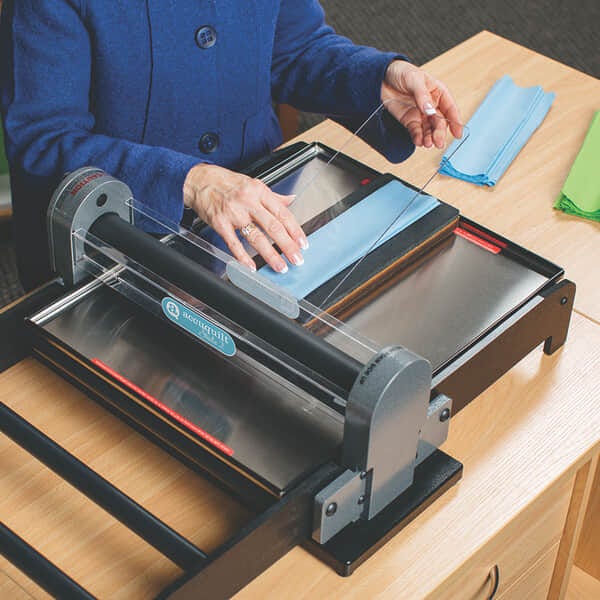
Lay die flat inside tray with FOAM
SIDE UP. Place fabric on top of
die. If desired, fan fold fabric to
cut multiple layers. Check
orientation of fabric for cutting
non-symmetrical shapes. Place
cutting plastic on top of fabric.

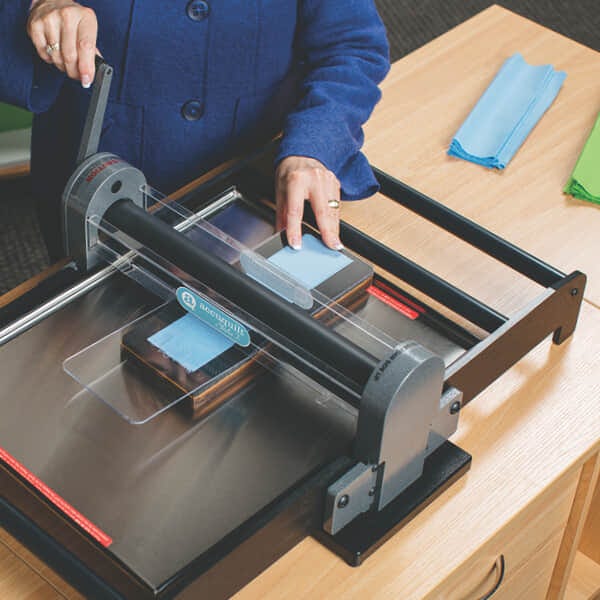
Push die, tray and plastic until
they contact roller. Turn handle
in the direction you want die to
go. If needed, continue pushing
until roller grabs die. Roll die
and tray through cutter.

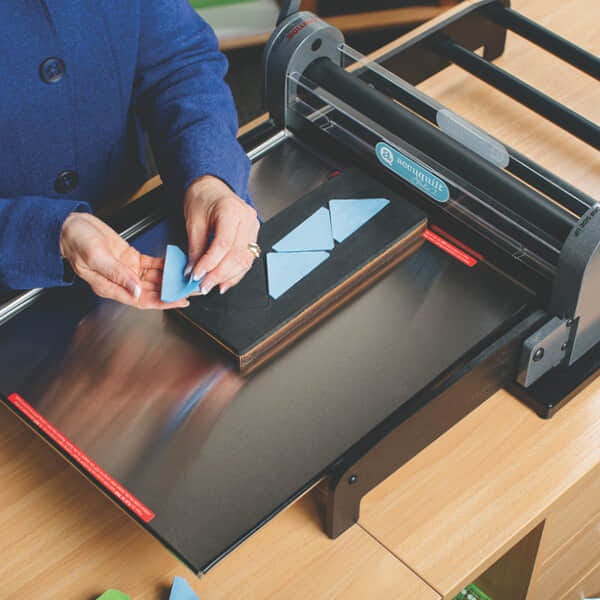
Remove cutting plastic and
fabric. Occasionally, threads
may need to be snipped
where cutting blades meet
on the die. Repeat process
from opposite direction.


Storage: Store Studio dies in AccuQuilt die storage cases or storage racks.

Studio Fabric Chart: Chart below is the recommend number of fabric layers; actual number of fabric layers will vary depending on fabric type and thickness.

Fabric Layers
Cotton 8-10
Cotton with Fusible Web 4-6
Batiks 8-10
Fleece 4-6
Flannel 4
Denim 2-4
Leather 2
Wool 4
Batting 4-6
Felt 4
Silk 8-10
Satin 8-10

Care & Maintenance: Cutter For best results, always keep your Studio cutter clean and lint free. To clean the cutter inside and out, use a soft dry cloth. Avoid abrasives, solvents and spray cleaners. If necessary, wipe with a damp cloth, then polish with a dry cloth. Use canned air to clear lint from roller area. The steel roller never needs replacing and withstands years of die cutting use. Please note: Some assembly is required when first setting up your Studio Fabric Cutter.

Care & Maintenance: Dies Use adhesive roller to clean lint and thread from dies. After each use, with the die pick provided with the cutter, remove any threads imbedded between blades and foam. It's normal for threads to get caught where blades meet in a die. Remove with tweezers or die pick. Die blades never need to be sharpened.

Warranty: AccuQuilt Studio Fabric Cutters have a lifetime guarantee. If you experience any defects in material or workmanship, simply notify AccuQuilt and we will repair or replace the cutter at no charge. All cutter die trays and cutting plastic are consumable parts and are not covered by the warranty. Replace trays annually depending on use. All Studio dies are guaranteed for one year.

Projects

Create something special with Studio Patterns and Projects:


Reviews

Customer Reviews

Items 1 to 10 of 69 total

per page
Page:
  1. 1
  2. 2
  3. 3
  4. 4
  5. 5
  6. ...
  7. 7
What took me so long? Review by Sara
Overall Rating

I purchased my Studio cutter several months ago, but didn't use it till recently. I love how easy it is to operate. So far I have cut out butterflies, scottie dogs, dragonflies, birds, and bunnies to sell. Cutting them was alot easier than packaging them. I just ordered both adaptors and can't wait to try them out with my GO dies. Thank you for a great product.

(Posted on 2/21/12)

Fabulous !!! Review by Kathleen
Overall Rating

I am in love with my Studio. So very easy to use. First die I used was the Take5. 20 full blocks cut in two passes, brilliant.

(Posted on 2/20/12)

fantastic Review by Karen
Overall Rating

This machine is the best. No more struggling with shapes, strips, etc. from cutting by hand! Everything goes together perfectly.
Karen

(Posted on 1/23/12)

This is the way to cut Fabric Review by C Gaile
Overall Rating

I have been using my Studio for a few years now and it is the best investment for quilting since the sewing machine! It will cut up to 10 layers of fabric and all pieces are exact. The initial investment is costly, but well worth the price (they have come down in price considerably since I bought mine). I hope to be able to keep building my dies over time. The only draw back is having to pick threads out of the dies - especially when using flannel, but if you do it frequently it is manageable. I can't buy Studio items in Canada and have to order from the US so shipping gets expensive - No Free Shipping to Canada, it doesn't matter how much you buy.

(Posted on 1/20/12)

My favorite Quilting tool since I started quilting 10 years ago Review by Kerri
Overall Rating

The Studio lives up to quality and uses as described easily! I have bought so many things that don't, so I guess that must be why I am so giddy. Studio is solidly built and the dies are even higher quality than I expected and truly do cut like butter. Since the Studio is so simple to operate and manual, not electrical, it isn't going to break down or have some hidden problem or catch finger or something. I have so far cut strips and cross cut them (It works and makes beautiful squares) half square triangles and small hexagons. I already used the go adapter and it worked great. If you can save the up money this is worth it!!

(Posted on 1/18/12)

OMG just used my new Studio Cutter Review by Diane
Overall Rating

I have had the Go cutter for over a year now and thought it was great but when the studio cutter came out with the adaptors to use Go dies I decided to get the Studio cutter. I just cut out my first quilt pieces and it was such a smooth process. I cut 8 layers and it was like going through butter. I loved my Go but if you have been wanting an easier cutting job go for the Studio. I found there was no effort to cut through the layers and the only drawback about the whole process is that I won't be getting the necessary exercise for my upper arms. Oh well I will put up with the bat wing arms because i will be able to cut so many more quilts for charity.
So happy that I made the decision to get the big Studio Cutter.

(Posted on 1/2/12)

Studio Cutter Review by Lovie
Overall Rating

I received my studio cutter and read the instructions. Now am excited about making the dresden template; so i will be making a child quilt and i want to use the dresden template. Can wait to get started.

(Posted on 12/30/11)

Merry Christmas to Me!!! Review by Nancy
Overall Rating

Between an unexpected Visa gift card from my new employer and the wonderful sale, I bought myself the Studio cutter for Christmas. It just arrived, it is set up and I LOVE IT!

(Posted on 12/30/11)

Ordered my Christmas to me! Review by Mary
Overall Rating

I finally did it - I ordered the Studio! It is my Christmas present to me and I can't wait to get it!!! Opening a quilt shop, I know this will really help!
Plus I ordered the Take Five die - what wonderful presents!

(Posted on 12/21/11)

AWESOME!!!!! Review by Alisa
Overall Rating

I LOVE the Studio cutter. I just received it, set it up and began cutting 5" square blocks. This is my first experience with a die cutter and I cann't believe how easily it cuts thru so many layers of fabric. Now my only problem will be the "need" for all those awesome dies. I am so glad I was able to purchase the Studio Cutter while it was on sale. To all those still trying to decide which cutter to purchase, go for the Studio while it is on sale. You won't regret it!!

(Posted on 12/17/11)

Items 1 to 10 of 69 total

per page
Page:
  1. 1
  2. 2
  3. 3
  4. 4
  5. 5
  6. ...
  7. 7

Write Your Own Review

Only registered users can write reviews. Please, log in or register

Help & Guides
Shipping
There is no shipping information available for this product at this time.